
What is a stamp layer and why use it…
Stamp layers are a gathering together of all the information on all the layers currently visible (eyeball turned on) – basically you’re merging all the layers without flattening them into one… you end up with the merged layer but all the layers that formed it remain visible beneath…
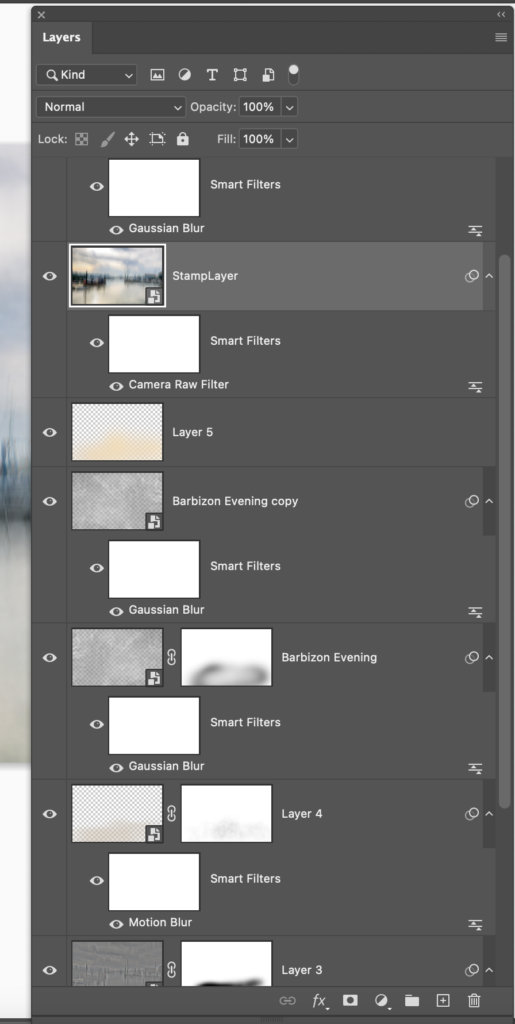
In the image on the right I have named the StampLayer so you can see this is one layer with all the information from the layers below in one merged image but all the layers that created it are still visible and available. I could delete the stamp or even blend it with the layers below.
One important thing to be aware of here is once you have created a stamp layer – any adjustments after that are affecting the stamp layer and will no longer affect the layers beneath – unless you delete the stamp layer…
To create a stamp layer – Command+Option+Shift+E or on a PC Control+Shift-Option+E
Why would I use a stamp layer?
When I’m pretty sure I’m nearly finished – I often use a stamp layer to create a merged layer to add final filter or camera raw edit to… For example you cannot create a high pass filter mask without using a stamp layer (want to learn how and why I would do that…click this line)..