
Smart objects in photoshop are like putting on sunglasses – the world looks different when you wear them but really it’s just the same…take them off and voila the world looks just as it always did before…
Smart objects are like that.. you put them on so all your edits are just like sunglasses – temporary filters through which we look at your image but easily removed and nothing on the final image has changed at all….
They protect resolution – with a smart object on the layer if you reduce it right down and then pull it back up to full size all the pixels remain in tact…
Without a smart object on it the image will be permanently altered, with a smart object you have flexibility to take those sunglasses off or edit the filter to suit your needs…
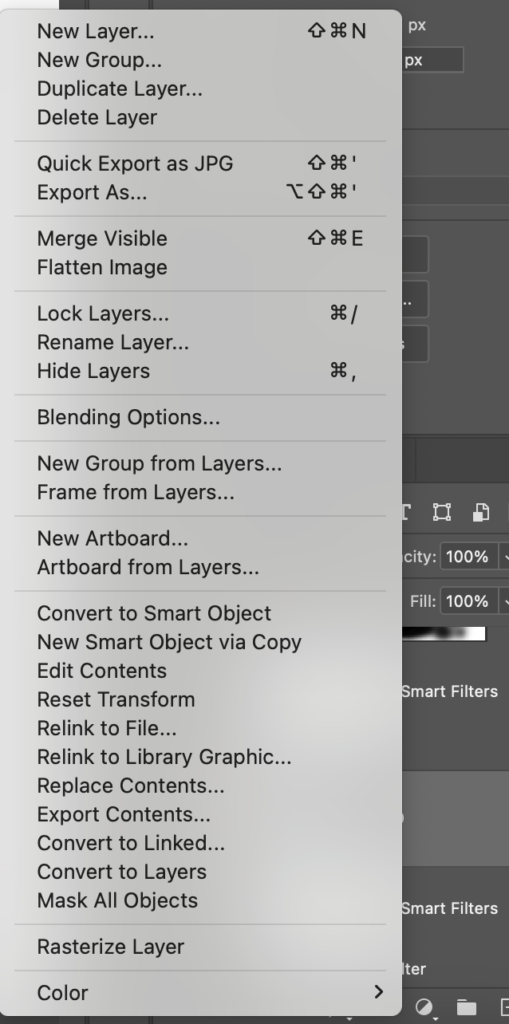
They create filter masks rather than filters that change the image – use any of the blur or artistic filters and you’ll get a filter mask you can switch on or off, paint on the layer mask to remove some of the effect where you don’t want it, even put a blend mode on it…
So smart objects preserve the pixels protecting them from change so nothing has changed, you’re just looking at the image through different sunglasses, or in this case filters… We call it non-destructive editing because while everything looks like it’s changed – the image itself is untouched under all those layers…
How to add a smart object to protect your image by right clicking and selecting ‘convert to smart object’. – see panel above…
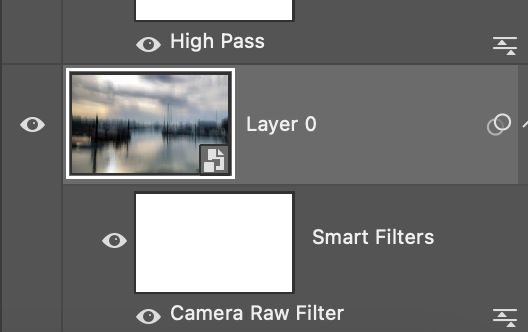
Now, when you add a filter (camera raw, blur, sharpen etc) you’ll get a filter mask that looks like this – now you can paint black on the mask to paint out where you don’t want the effect or go back in and adjust the filter by clicking on the name of the filter below the filter mask.
Turn off the smart object – right click and select ‘rasterise the layer’
NOTE – if you rasterise the layer when there are filters on it you’ll lose the power to change them as it flattens all the information into the image…
In the edit of the Marina I use smart objects to protect my layers going back in and out to see what I did later on as I talk through the edit…LymingtonMarinaEDIT
